
To understand how billable hours work in an SDaaS framework, you first need to see how the hour bank system organizes and tracks your hours each month. While it may sound technical at first, the Smicolon approach makes the entire structure much easier to understand. According to the GitLab Global DevSecOps Report, more than 40% of software teams face delivery slowdowns due to unclear or inefficient workflows, which is why having a predictable structure like the hour bank system makes such a meaningful difference inside SDaaS.
With that understanding, you can easily see how much development time you have each month and how that time supports your project. This means you no longer have to guess where your team’s time is going — you begin the month with a specified amount of time that’s clearly set aside for your project. All types of work, including planning, coding, testing, communication, reviews, and even design tasks, can fit naturally into this setup, making everything easier to understand and manage as the work progresses.
Since your development time is already planned, the team can start working right away without waiting for new quotes or approvals. This avoids delays, keeps progress steady, and makes it easier to adjust priorities as your project evolves. Your usage tracking is always visible, and you receive updates as you get closer to using most of your hours. It works much like any professional billable hours system, giving you a dependable system you can rely on throughout the process.
In this blog, you'll get a complete picture of how your hour bank system works every month, what counts as billable hours, how your usage is tracked, and what your options are when your hours are fully consumed. You'll also learn how Software Development as a Service uses this model to deliver a more predictable and client-friendly development experience. If you are new to this concept, our SDaaS guide can help you build a quick foundation. Once you have that context, you’ll see how the hour-bank structure and SDaaS model work together to deliver smoother progress, clearer visibility, and a far more reliable development experience overall.
Understanding Your Monthly Hour Bank
Your Monthly Hour Bank is simply the set of prepaid development hours that come with your SDaaS subscription, and, as Workmeter describes, it’s essentially a structured way to manage hours within a defined balance. This setup aligns with how we allocate your time and gives you a clear starting point each month.
When you pick a plan — Start (80 hours/month), Grow (160 hours/month), or Scale (240 hours/month) — that number of hours is reserved for you every month. You can compare these options on our Subscription Plans page.
Once your plan is selected, these hours are released from your larger prepaid hour bank, which you receive upfront when you purchase your package. This is guided by the hour bank system, which manages how your hours are distributed each month.
Think of it this way:
- Hour Bank: total prepaid hours for the entire commitment period
- Standard Monthly Hours: the hours released each month for active development
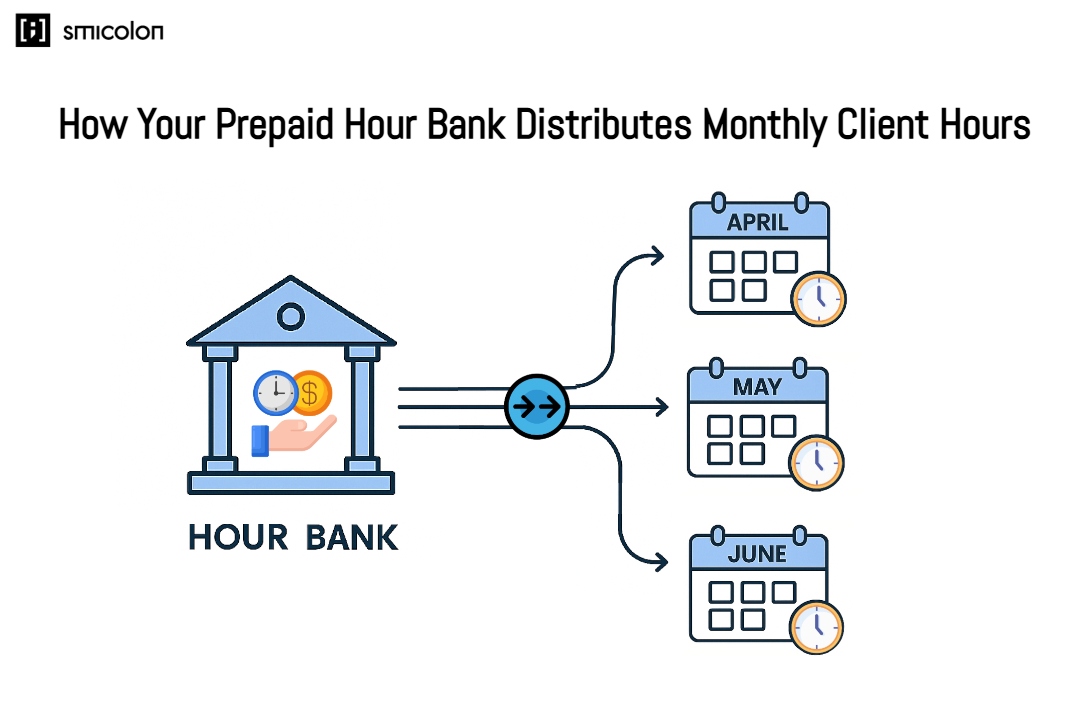
Your hour bank is the total pool of discounted, prepaid hours included in your commitment period. This bank sits in the background as your master balance. Each month, a fixed number of hours from your plan (80, 160, or 240) is deducted from this pool. Those hours fuel all the essential work that moves your project forward — planning, coding, testing, debugging, communication, documentation, and design tasks if you’ve added design add-ons. And if you use up your monthly hours early, you still have leftover hours stored in your hour bank, ready for you to decide how to use them.
From this hour bank, your standard monthly hours are released — this becomes your monthly operating balance. It’s the set amount of time your team works with each month, and everything they do is pulled from this balance.
This structure keeps things predictable and gives you a clear, real-time view of your monthly usage as the month progresses. Because every hour goes directly into active development work, you always know how your billable hours are being used and what your team is focusing on. This setup gives you steady monthly capacity while still showing you how your prepaid hours flow throughout your SDaaS engagement.
How the Hour Bank System Works Each Month
How Your Monthly Hours Are Used
Once your monthly hours are set, the Smicolon team just starts using them as they work on your project. The time they spend on any part of the work is deducted from your hour balance. Since everything is already prepaid, the team doesn't need to pause for new quotes or approvals. Tasks move forward within your existing balance, which keeps momentum strong and helps prevent delays. Throughout the month, your hour bank acts as your project's "fuel tank,” giving you a clear view of your usage tracking as work continues.
What Counts as Billable Hours
Billable hours include all the time the team spends actively working on your project. This covers the whole process — planning, building, testing, reviewing, and coordinating and each part is deducted from your monthly balance. All of these activities together form the billable tasks that make up your monthly hours. This structure makes the entire software development as a service model easier to follow because every type of work is accounted for within the same framework.
These tasks typically include:
- Planning and architecture
- Programming, testing, and debugging
- Project management and coordination
- Design tasks (if part of your package or added separately)
- Meetings, workshops, and communication
- Documentation and quality reviews
In simple terms, if the task requires hands-on effort from the team, it is treated as time deducted from your monthly hour balance.
Examples of billable hours include:
- Writing or refining a feature's code,
- A workshop session to align on requirements,
- Reviewing pull requests,
- Preparing technical documentation,
- Fixing bugs identified during testing,
- Creating UI/UX improvements based on feedback,
- Setting up integrations with third-party services,
- Configuring deployments as part of ongoing development.
How Your Hour Usage Is Tracked
Smicolon keeps track of your hour usage throughout the month, so you always know how much of your balance has been used. It shows you how your hours are distributed across different tasks, similar to how a billable hours tracker would display activity in real time. MinuteDock also explains this idea, showing how structured time tracking helps teams keep track of every hour, just like we monitor your usage across tasks each month. This makes it easy to stay aware of your usage.
As your usage gets close to 70–90%, you’ll receive a reminder that you’re nearing the end of your monthly hours. This doesn’t slow your work or change anything — it just keeps you updated so you’re not surprised later. Even if you miss the reminder, your work continues normally. The tracking system provides clarity and helps you plan ahead, making the SDaaS process more transparent and easier to manage.
To make this tracking more transparent, Smicolon uses a dedicated Hour Bank Calculator dashboard. The dashboard gives a real-time view of total prepaid hours, monthly usage, remaining balance, and recent activity—so you can clearly see how your billable hours are being used throughout the month.
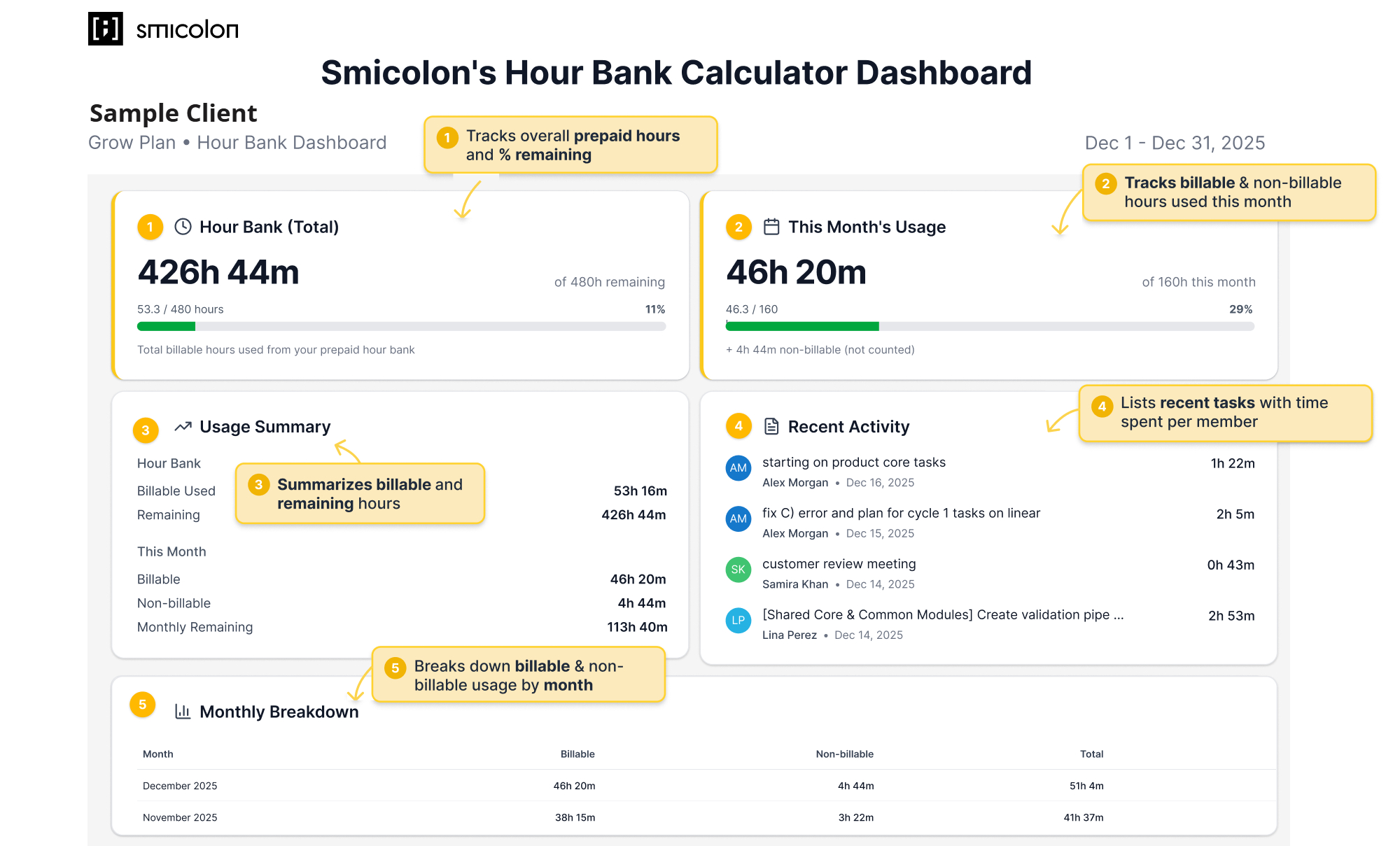
The dashboard highlights how hours are distributed across monthly usage, billable and non-billable work, recent activity, and historical breakdowns—giving full visibility into where time is spent and how much capacity remains.
How Unused Hours Work
When your Minimum Commitment Period ends, any unused hours in your Hour Bank expire. These hours are non-refundable because Smicolon keeps a dedicated team and resources available for your project throughout the entire period.
Since that time is reserved for you, unused hours can’t automatically be moved or carried over. If you want to transfer hours to another project, it can only happen with Smicolon’s written approval. This keeps scheduling clear and reliable, based on how your monthly usage has changed over the commitment period.
This end-of-period rule is separate from what happens when you run out of hours during the month, which works a little differently.
When Your Monthly Hours Finish Before the Month Ends
Some months simply move faster than others, and it’s completely normal to reach your monthly hours before the month is actually over. If you’re on the Grow plan, for example, you may use up your 160 hours even though there are still days left in the month. When this happens, you’ve essentially reached the limit of your billable hours for that cycle, but the work doesn’t have to stop.
You simply choose how you want to move forward. There are three ways to continue, and each option keeps you in control of your pace, priorities, and budget.
1. Pause Until Next Month
If things aren’t urgent, you can pause development and restart when the new month begins and your standard hours refresh. It’s the simplest option: no extra charges, no added complexity — just a clean reset when the next cycle starts.
2. Continue Using Your Prepaid Hours
Most clients prefer to keep moving, especially when their project is moving smoothly. This is Smicolon's default approach, where the team continues working without interruption. When you need additional work, the extra hours are simply pulled early from your prepaid hour bank at the same discounted rate.
Nothing changes in your workflow:
- You hit your monthly limit,
- The team keeps working,
- Extra hours come from your hour bank,
- Those hours appear on next month's invoice.
This option keeps everything running naturally without needing new approvals or changes to your plan.
3. Continue Using at a Premium Rate
If you want to save your hour-bank balance for future phases or only need a small push to finish something important, you can continue development at the premium hourly rate (€75–€100/hr). These hours are billed in the current month and give you flexibility without touching your prepaid pool. To make this easier to understand in a real project, let's look at a simple example.
Practical Overview of Your Options
Imagine you're on the Scale plan, which gives you 240 hours per month. This month, your project picks up speed, and all 240 hours are used by Day 20. Here’s how that scenario plays out — and the choices you have.
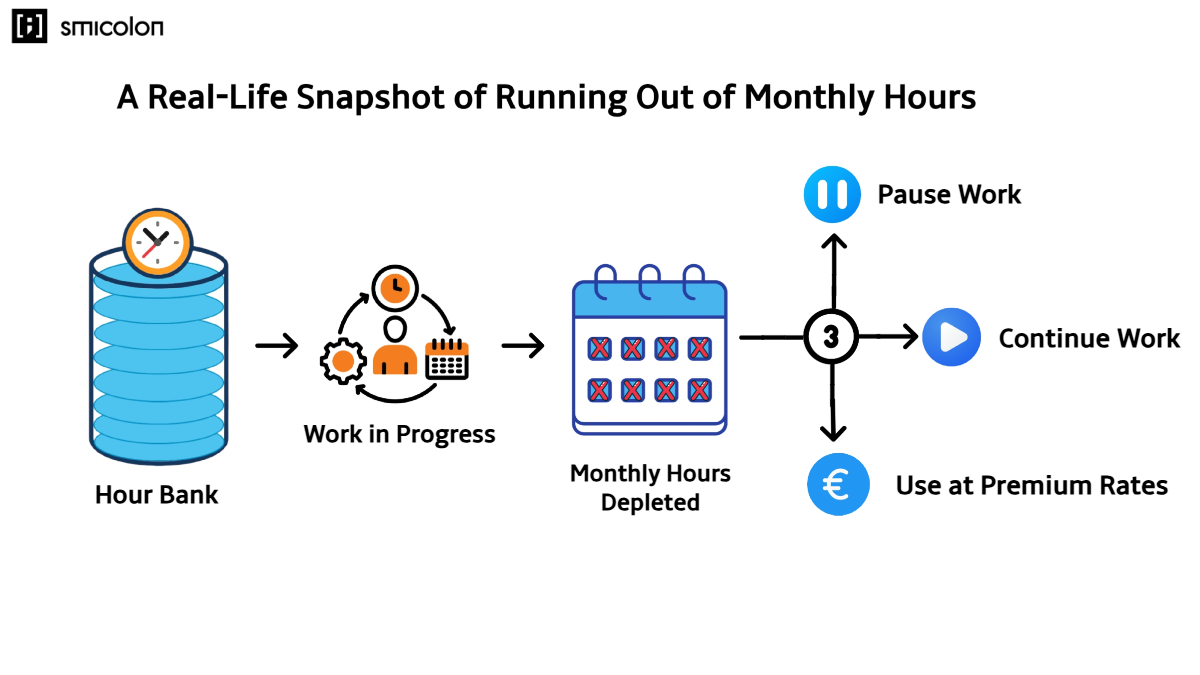 You've used all your monthly hours early. These are your options:
1. Pause Work
Work stops on Day 20 with no extra costs, and it resumes on the 1st of the next month when your 240 hours refresh.
2. Continue at the Discounted Rate
The team keeps working on Day 21. For example, if they use an extra 15 hours, those hours are simply taken early from your prepaid hour bank and will appear on next month’s invoice at your discounted rate. Your project continues without any slowdown.
3. Continue at the Premium Rate
The team also continues on Day 21, and the same 15 hours are completed, but they're billed at the premium rate and appear on this month's invoice. This option helps you save your hour-bank balance for later phases.
These choices let you decide whether to pause, continue at your discounted rate, or work at a premium rate — all while keeping your project entirely under your control. Together, they show how flexible the hour bank model is and how naturally it fits into the SDaaS process.
Now that you know how your options work, let’s look at why Smicolon uses this model in SDaaS and how it strengthens your overall development process.
The Power of Pairing SDaaS with an Hour Bank System
One of the biggest reasons Smicolon uses an hour-bank model in SDaaS is to make the entire development process more predictable and entirely in your control. If you want to learn more about how we deliver SDaaS as a service, you can visit our SDaaS service page. Within this model, your project begins with a clear structure and predictable workflow — creating a smoother, more transparent experience from the start.
By giving you a fixed pool of prepaid hours each month, the SDaaS model ensures that your project runs within a clear and agreed-upon structure. This gives you a stable framework where both your cost and your team’s capacity are already defined, allowing you to plan confidently and manage progress without uncertainty.
Because the hours are allocated upfront, the team can begin tasks immediately without waiting for new approvals or quotes. Unlike many offshore software development models, this structure eliminates delays and gives you full visibility from the beginning. Work moves forward as soon as priorities are defined, which keeps momentum steady and prevents unnecessary delays. You always know how much capacity is available, what the team is focusing on, and where your monthly balance is being used.
This model also gives you room to adjust as needed. Projects change, and priorities can shift quickly. With an hour bank inside a software development as a service model, adjusting the plan simply means deciding what matters most right now. You redirect your monthly usage toward the highest-value tasks without needing new approvals or updated estimates — keeping the entire workflow responsive and easy to manage.
Transparency is built into the structure. Your hour usage is tracked throughout the month, and you get a heads-up as you start getting close to the end of your monthly hours. This helps you stay aware of your monthly usage before decisions need to be made, allowing you to plan confidently without unexpected costs.
By combining SDaaS with a clear hour-bank system, Smicolon delivers a development process that’s easier to understand, easier to manage, and far more predictable. You get clarity, flexibility, and control — all within a framework designed to keep progress steady and aligned with your goals. In short, the hour bank turns SDaaS into a transparent and predictable structure, giving you clear visibility into progress, remaining hours, and what comes next.
Conclusion
The hour-bank model is central to how SDaaS works at Smicolon. By combining predictable monthly hours, transparent tracking, and a reserved development team, it creates a development process that is easier to manage, easier to plan, and easier to trust. You gain the clarity, flexibility, and control needed to move your project forward with confidence—making the SDaaS approach a more structured and client-friendly alternative to traditional offshore software development models.